



Instructions: Entry of Individual Member Engagement Activities

Log in to www.hfma.org and navigate to My Account> My Engagement Points.
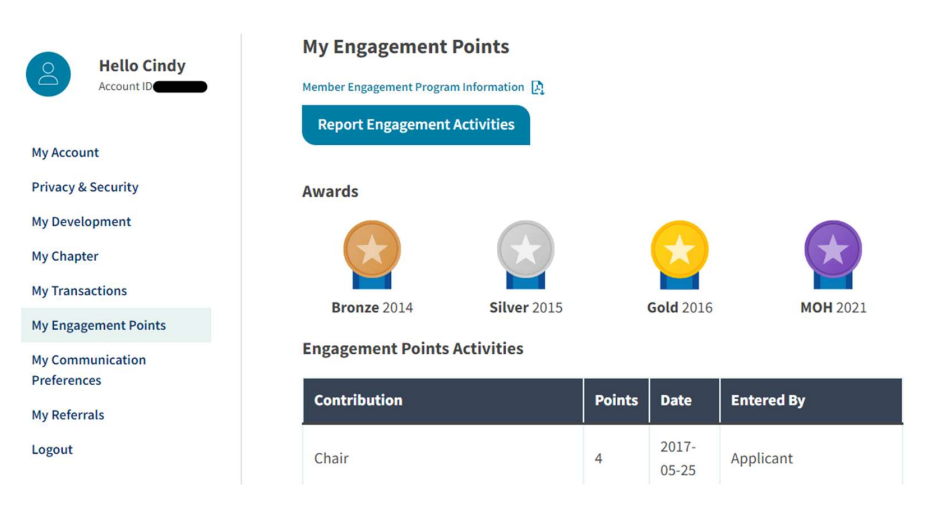
Click Report Engagement Activities to enter activities. There is an option to enter engagement activities as single entries or in a spreadsheet.
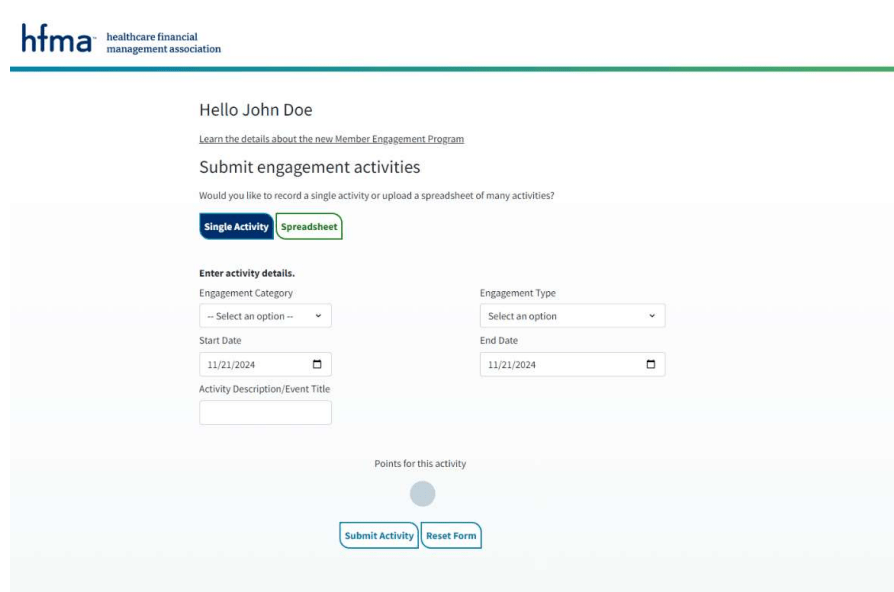
NOTE: To use the Spreadsheet, download to your desktop and use the drop-down menus to make selections. If the drop-down menus are not visible, enable pop-ups. You will need your member ID, which is displayed under your name on the main profile page.
Engagement Activity Details
- Select the Engagement Category to then view/select the Engagement Type
- The following activities can be entered via the entry form or bulk upload spreadsheet:
| Engagement Category | Engagement Type |
|---|---|
| Literary Contributions | Write Articles – Local Chapter |
| Article/Content Review – National | |
| Book Review – National | |
| Review of HFMA Programs/Initiatives | |
| Write Articles – National | |
| Event Contributions | Event Volunteers |
| Facilitation/Moderation | |
| Speakers (first presentation of topic) | |
| Speakers (subsequent presentations of same topic) | |
| Miscellaneous | Mentor |
If you have questions or need assistance, please reach out to the Member Services Center at [email protected] or 800.252.4362.